-

Coding is our passion...
-
Advance iOS Technologies...
-

State of art industry projects...
-
Advanced Solutions...
iOS Development
iOS Programming Security
MDAP Intro
Learn by Doing
We've prepared exclusive interview pointers and questions bank for our registered students. You can access the questions bank using your student id and password.
Currently, our question bank can be accessed via HanuInnoTech Mobile App or On-line.
Real-time projects challenge the students’ learning and enable them to apply the class concepts to solve business requirements or industry problems.
Here are some of the real-time mobile projects:
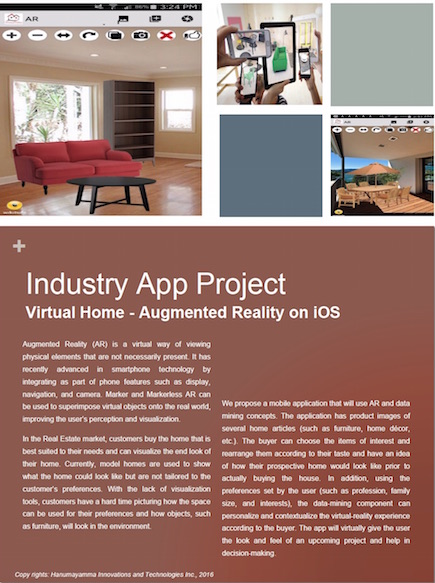
 Augmented Reality Mobile App enables to apply augmented reality concepts to develop mobile applications. These applications are focused towards marketing and consumer experience delivery.
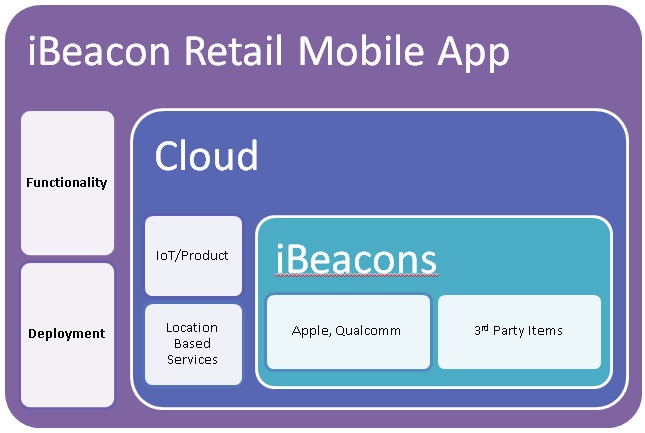 iBeacon Retail Apps: iBeacon Retail Apps enable to deliver context aware advertising to end users. These apps enable exclusive coupons and deals to the end consumer.
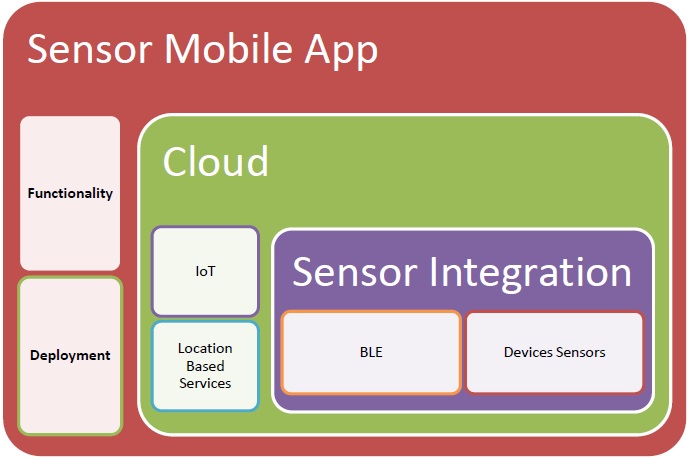 Sensor Mobile App enables to collect real-time device details on Bluetooth Low Energy interface. Using the App, one can connect Bluetooth enabled devices such as medical diagnostic equipment, Blood Monitoring Devices, and Home Devices.
 E-commerce Mobile App enables to search, quote, and order product itemsets of retailers or commerce companies. E-commerce Apps employ datasets from companies such as Walmart, BestBuy, and many other retailers.
We've prepared exclusive interview pointers and questions bank for our registered students. You can access the questions bank using your student id and password.
Currently, our question bank can be accessed via HanuInnoTech Mobile App or On-line.

We've prepared exclusive interview pointers and questions bank for our registered students. You can access the questions bank using your student id and password.
Currently, our question bank can be accessed via HanuInnoTech Mobile App or On-line.
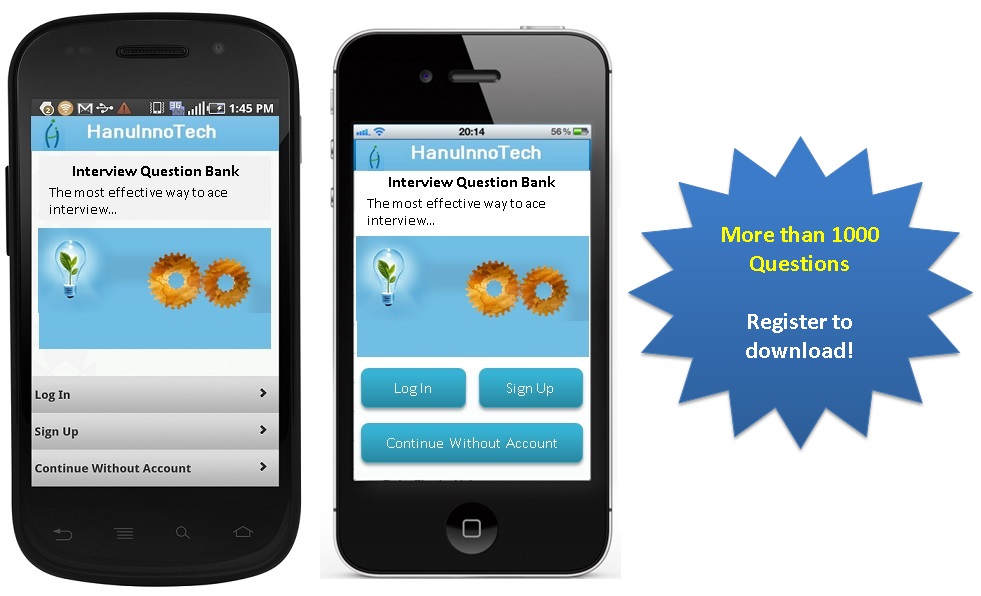 We've also published hard copy of question bank. Here is preview:
The below document is hard copy of Basic iOS Schedule. Please download for preview:
The below document is hard copy of Advance iOS Schedule. Please download for preview:
Week 1 (Getting Started)
Designing Apps for iOS Introduction
- iOS Design Principles
- iOS App Anatomy
- Xcode Overview
Week 2 (App Design Basics)
Introduces iOS App Basics
- Core App Objects
- NS Object Hierarchy
- Introduction to UIKit
- MVC Model
- Event Driven Application Architecture
- Main Event Loop
Week 3 (iOS Core Objects)
Introduces Core iOS Objects
- Delegates
- Application Objects
- Responder Object
- iOS Events
- Window Object
- The Role of Objects in an iOS App
Week 4 (App State Management)
The goal is to introduce App state management.
- UI Storyboard demo
- Managing App State Changes
- iOS Life Cycle Comparison with other Mobile OS
- App Launch Cycle & Sequence
- Responding to Interruptions
- Background App Design principles
- Life Cycle Management – moving to Background
- Memory Usage & App States
- State Preservation & Restoration
- State Transit App
Week 5 (Data Storage)
Introduces Data Storage techniques.
- Files
- NS Data
- Archives
- Coders
- Object Graphs
- Develop an iOS App that stores User entered data to File & Codes
Week 6 (Cloud & Embedded Data Storage)
Introduces concepts of embedded mobile databases and Cloud storages.
- SQLlite
- Core Data
- iCLoud
- Develop an iOS App that Stores Transaction Data
Week 7(Location Services)
Introduces iOS Location Services.
- Location Services and Maps
- Significant and Standard modes
- GeoCoding
- Core Location Framework
- Map Kit
- Tips for Conserving Battery
- Develop location aware iOS App
Week 8(Sensors)
Introduces sensor framework.
- Sensor Framework
- IOKit
- Camera
- Develop Sensor App
Week 9(Internet of Thins and Internet of Everything)
Develop an IoE/IoT App.
- Introduction to Core Bluetooth Frame work
- Interface with third party IoT Kits (Intel and others)
- Develop BLE Apps
- BLE Tags and develop business case App
Week 10(App Publishing)
Introduces Ad-hoc and standard App publishing.
- Custom App Publishing
- Apple Store Publishing Guidelines
Week 11(Project)
- Project
Security Emphasis
BLE
Android Development
Fees: $1000
Duration: 10 Weeks
Days/Time: Lecture: Friday 7:00 pm - 9:30 pm
MDAP Intro
We've prepared exclusive interview pointers and questions bank for our registered students. You can access the questions bank using your student id and password.
Currently, our question bank can be accessed via HanuInnoTech Mobile App or On-line.
Real-time projects challenge the students’ learning and enable them to apply the class concepts to solve business requirements or industry problems.
Here are some of the real-time mobile projects:
We've prepared exclusive interview pointers and questions bank for our registered students. You can access the questions bank using your student id and password. Currently, our question bank can be accessed via HanuInnoTech Mobile App or On-line.
We've prepared exclusive interview pointers and questions bank for our registered students. You can access the questions bank using your student id and password.
Currently, our question bank can be accessed via HanuInnoTech Mobile App or On-line.
We've also published hard copy of question bank. Here is preview:

Week 1 (Getting Started)
After you've installed the Android SDK, start with this class to learn the basics about Android app development
- Android Overview
- Introduction to Android Architecture
- DEX File Anatomy
- Demo: Hello World – Android Application
- Complete Android Development Setup
- Complete Running of Hello World App
Week 2 (Managing the Activity Lifecycle)
How Android activities live and die and how to create a seamless user experience by implementing lifecycle callback methods
- Understanding the Lifecycle Callbacks
- Android Activity Life Cycles
- Starting an activity
- Pausing and resuming An activity
- Recreating an activity
- Develop Activity Life Cycle App
Week 3 (Building a Dynamic UI)
Develop Android UI
- Introduction to UI Components
- Layouts
- Layout Summary
- Create Fragments
- Create an App with Relative Layout and Grid Layout
Week 4 (App State Management)
The goal is to introduce App state management.
- UI Storyboard demo
- Managing App State Changes
- iOS Life Cycle Comparison with other Mobile OS
- App Launch Cycle & Sequence
- Responding to Interruptions
- Background App Design principles
- Life Cycle Management – moving to Background
- Memory Usage & App States
- State Preservation & Restoration
- State Transit App
Week 4 (Data Persistence)
Introduces several available options to save the Data.
- Data Storage Options
- Introduction to Shared Preferences
- Develop Android App that Stores User Inputs using the storage options
- Develop Cloud Mobile App
- Internal Storage (Files)
- External Storage (SD Card)
- Embedded Database - SQLite
- Introduction Cloud data storage
Week 5 (Content Sharing)
Create apps that share data between apps and devices.
- Intents
- Implicit & Explicit
- Sending Content to Other Apps
- Security Considerations – passing data between Apps
- Sharing Files with NFC
- Develop an Android App that send data to others Apps using Intents
Create apps that share data between apps and devices.
- Intents
- Implicit & Explicit
- Sending Content to Other Apps
- Security Considerations – passing data between Apps
- Sharing Files with NFC
- Develop an Android App that send data to others Apps using Intents
Week 6 (Process and Threads)
Introduces Android Processes and threads.
- Process Importance Hierarchy
- Create Threads
- AsyncTasks
- Create a simple Thread Application
Week 7 (Services)
Android Services introduction.
- Intent Service
- Bound Service
- Sending Notification from Service to User
- Life Cycle of Service
- Best practices for Background Jobs
- Develop Background Service App – to automate a long running process
Week 8 (Location Aware Services)
How to add location-aware features to your app by getting the user's current location.
- Retrieving Current Location Information
- Creating and Monitoring Geofences
- Google Mapping Services
- Develop Location Aware App
Week 9 (Sensor Programming)
Introduces Android Sensor programming.
- Use Case of Sensors in Apps
- Sensor Framework
- Monitoring Sensor Events
- Sensor Batching
- Develop Sensor App – toggle Camera and Other Sensors
Week 10 (Apps with Connectivity and Cloud)
Develop Apps that use Connectivity (Bluetooth Low Energy) and Google Cloud.
- Introduction to Low Power BLEs
- Introduction to Cloud Connectivity
- Google Cloud Messaging (GCM for Android)
- Sync data using GCM
- Develop BLE Interface App
- Develop GCM Interface App
Week 11 (Wearables)
These topics teach you how to build notifications in a handheld app that are automatically synced to wearables as well as how to build apps that run on wearables.
- Adding Wearable Feature to Notifications
- Creating Wearable Apps
- Sending and Syncing Data
- Develop a Simple Wearable App (Hardware or Simulator
Week 12 (Introduction to Security Frameworks)
These topics teach you how to build notifications in a handheld app that are automatically synced to wearables as well as how to build apps that run on wearables.
- Cryptography
- Web Services Security
- Data Security (motion or at Rest)
Week 13 (App Publishing)
- Introduces the steps to publish your App
Week 14 (Develop a real-life Android App and deploy to Play Store)
- App Development, testing, and Deployment